3D Layered Paw: Creative Design for Decor
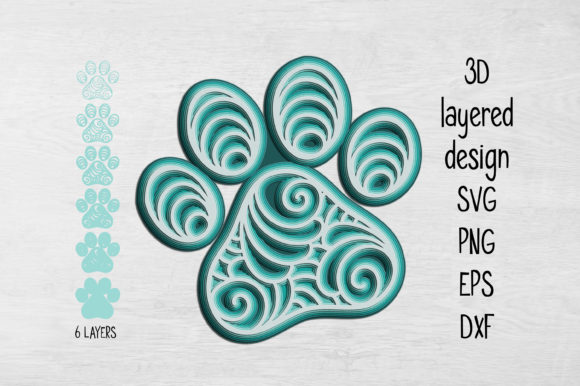
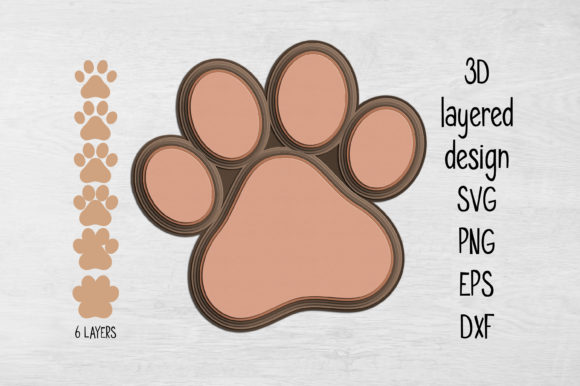
Imagine a simple paw print that suddenly gains depth, shadow, and dimension. This is the essence of 3D Layered Paw, a versatile design concept that transforms flat images into tactile art pieces. Unlike standard decals or single-layer cutouts, this design relies on stacking multiple distinct elements to create a sense of volume. The result is a striking visual that catches light from different angles, making it an ideal centerpiece for home decor, wall displays, or thoughtful gifts.
The beauty of this project lies in its adaptability. You are not bound by a single rigid outcome. The design consists of several layers that you can arrange however you wish. Some creators choose to assemble every single layer to achieve maximum depth and complexity, while others prefer a minimalist approach using just two or three key sections. Furthermore, there are no strict rules regarding color. Whether you opt for a natural wood finish, bold primary colors, or a subtle monochromatic palette, the combination is entirely up to your creative vision.
Why Different Audiences Value This Design
While the core product remains the same, the value proposition shifts depending on who is holding the scissors or operating the laser cutter. For a hobbyist looking for a weekend project, the appeal might be the fun of mixing materials. For a small business owner, the focus could be on production speed and scalability. Understanding these varying perspectives helps clarify why this specific design is so widely applicable.
For Beginners and Hobbyists
If you are new to crafting with digital files, the 3D Layered Paw offers a forgiving entry point. The instructions are straightforward, but the flexibility allows you to experiment without fear of ruining the entire piece. Beginners often prioritize ease of use and the joy of seeing a physical object come to life from a screen. You can start by cutting only the outermost layers to keep the project manageable. Using card stock is a great way to test the design before investing in more expensive materials like plywood. The ability to resize the design also means you can practice on a smaller scale if your workspace is limited, though you must be cautious with thin details.
For Experienced Creators and Professionals
Seasoned makers and professional designers see the 3D Layered Paw as a canvas for technical refinement. They care deeply about material quality and the precision of the cuts. A professional might choose MDF or high-grade plastic to ensure durability and a premium feel. Their priority often shifts toward presentation and longevity. By selecting contrasting colors between layers, they can enhance the 3D effect, creating a piece that looks sophisticated enough for a gallery or a high-end retail environment. For these users, the inclusion of formats like DXF and EPS is crucial, as these allow for seamless integration with industrial-grade machinery.
For Educators and Students
In an educational setting, this design serves as an excellent tool for teaching spatial reasoning and geometry. Teachers can use the layered structure to explain how depth is created through subtraction and addition. Students learn about tolerance—the space needed between layers for them to fit together—and how different materials react to cutting tools. It is a practical example of STEM concepts applied to art. The requirement to consider thin elements when resizing adds a layer of problem-solving that challenges students to think critically about the limitations of their tools.
For Entrepreneurs and Small Business Owners
For those selling handmade goods, the commercial value of this design is significant. It allows for customization at scale. A seller can offer customers the choice of layer count or color combinations, effectively creating unique products from a single digital file. The ability to produce variations quickly helps in managing inventory and meeting diverse customer demands. However, reliability is key here; the files must be robust enough to handle repeated production runs without errors. The ZIP folder containing SVG, PNG, EPS, and DXF ensures compatibility across various cutting machines, reducing downtime and technical friction.
Material Choices and Practical Considerations
The success of your project often depends on the substrate you select. The design recommends card stock, wood, plastic, plywood, and MDF. Each material brings a different aesthetic and functional benefit.
- Card Stock: Perfect for quick prototypes or lightweight decorations. It is cost-effective and easy to work with, making it ideal for children's crafts or temporary displays.
- Wood and Plywood: These materials add warmth and a rustic charm. They are durable and suitable for items that will be handled frequently, such as wall art or nursery decor.
- MDF (Medium Density Fiberboard): Known for its smooth surface, MDF is excellent for painting and achieving a clean, finished look. It holds fine details well, provided the cutting machine has sufficient power.
- Plastic: For a modern, sleek appearance, acrylic or other plastics can be used. This is particularly effective for neon-colored designs or projects requiring water resistance.
Navigating Size and Detail Constraints
One critical aspect of working with 3D Layered Paw is understanding the relationship between size and detail. While the design is fully resizable, reducing the dimensions too much can compromise the structural integrity of the piece. Thin elements within the paw print may become too fragile to cut or hold their shape if the project is scaled down beyond a certain threshold. Before committing to a small size, carefully inspect the vector lines. If the gaps between layers are microscopic, the design might not work well for smaller projects. In such cases, sticking to larger sizes or simplifying the layer count is advisable.
File Formats and Compatibility
When you receive the download, you will get a comprehensive ZIP folder containing four distinct file formats: SVG, PNG, EPS, and DXF. This variety ensures that your machine can read the file regardless of its brand or age.
- SVG: Ideal for most modern home cutting machines like Cricut and Silhouette. It is scalable without losing quality.
- PNG: Useful for printing or viewing the design on screens before cutting.
- EPS: A standard vector format preferred by professional graphic software and older laser cutters.
- DXF: Essential for CNC routers and industrial laser engravers that require precise coordinate data.
Before starting, verify that your equipment supports one of these formats. This simple step prevents frustration and ensures a smooth workflow from digital file to physical object.
Final Thoughts on Your Next Project
Whether you are designing a personalized gift for a loved one, creating content for a blog, or building a line of home decor products, the 3D Layered Paw offers a flexible foundation. It bridges the gap between digital creativity and tangible reality. By choosing the right materials, respecting the limits of scaling, and leveraging the available file formats, you can create something truly unique. The decision to use all layers or just a few, and the choice of colors, ultimately defines the character of your final piece. With this design, the only limit is your imagination.